


GPS+ Maps, Navigation, Traffic
4.53.03K Reviews
App Specs
- Version
- 4.0.55
- Updated On
- License
- Free
- Downloads
- 10,000,000+
- Developer
- JVSTUDIOS
- Categories
- Maps & Navigation
- Platform
- Android
Screenshots
 Analysis by AppCompare
If you've ever found yourself lost in the maze of city streets or wandering aimlessly in unfamiliar territory, you know the value of a reliable navigation app. Enter GPS+ Maps, Navigation, Traffic, an app that promises to be your trusty co-pilot on both epic road trips and everyday commutes. Here’s my take on this handy tool after a deep dive into its features.
Exploring the Features
GPS+ Maps, Navigation, Traffic packs a punch with its robust set of features designed to make your journey smoother than ever. From real-time traffic updates to offline maps, this app seems to have it all. Let's break down what makes it tick.
Real-Time Traffic Updates
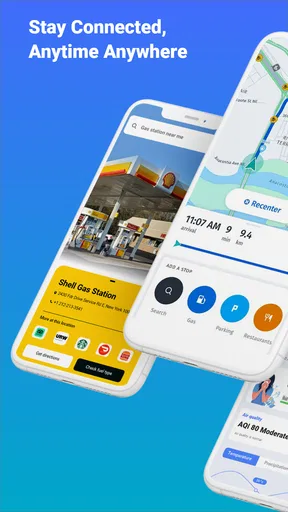
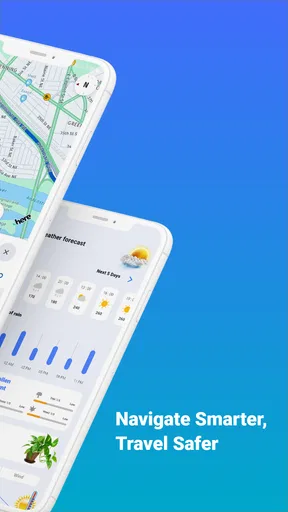
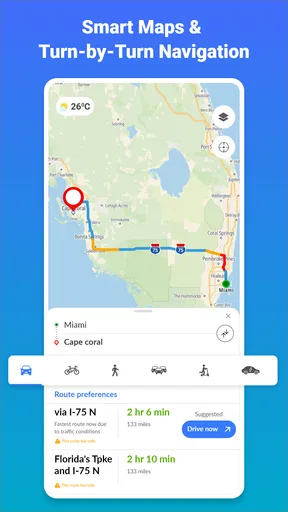
One of the standout features of this app is its ability to provide real-time traffic updates. Imagine cruising down the highway and getting a heads-up about a traffic jam miles ahead. The app calculates faster alternative routes on the fly, saving you precious time. It's like having a personal traffic assistant riding shotgun.
Offline Maps
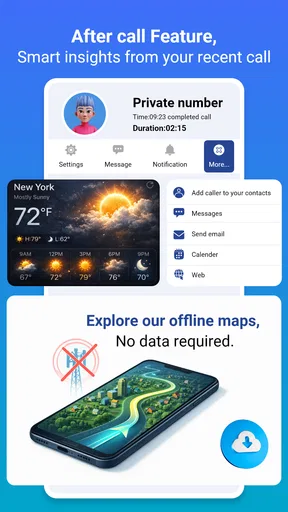
We've all been there—losing signal just when you need it most. With offline maps, you can download maps in advance and use them anytime, anywhere, without worrying about spotty network coverage. This feature is a lifesaver when venturing into remote areas or when your data plan is running low.
Voice-Guided Navigation
Keeping your eyes on the road is crucial, and the app’s voice-guided navigation ensures you don’t have to constantly glance at your phone. The clear, concise voice prompts guide you through every turn, making driving not just safer but also more relaxed.
Points of Interest
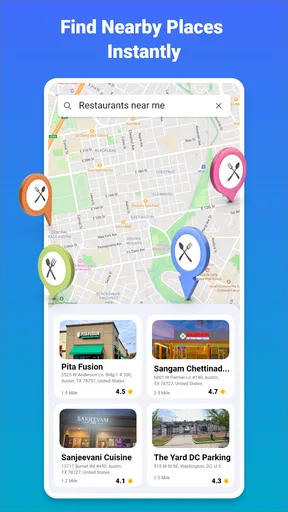
Whether you're looking for a cozy café or a gas station, the app’s extensive list of points of interest has got you covered. It’s like having a local guide wherever you go. You can even filter searches based on your preferences, making it easy to find exactly what you need.
User Experience
So, how does it feel to actually use GPS+ Maps, Navigation, Traffic? In a word: intuitive. The interface is clean and user-friendly, allowing even the least tech-savvy individuals to navigate with ease. The map visuals are crisp, and the navigation is smooth, with no noticeable lag.
Worth Reading Before You Choose

EA SPORTS FC Mobile 26 Is a Bigger Football Game, but It Takes Time

Flipboard Shows What News Apps Must Do Beyond the Feed

Switching to Android Auto Means Rethinking Your Driving Routine

Google Calendar Makes a Crowded Week Easier to Manage

Ludo King Makes the Most of the Minutes Between Plans

Baby Panda World Brings Quick Play to Modern Phones, but Its Game Library Feels Busy
The app also offers customization options, letting you tweak settings like voice types and map views to suit your personal taste. It's these little touches that enhance the overall experience, making it not just a tool, but a pleasure to use.
Battery and Data Usage
One concern with navigation apps is their tendency to drain your phone’s battery. Thankfully, this app is optimized to be lightweight, minimizing battery consumption without compromising performance. The data usage is also surprisingly efficient, which is a bonus for those on limited data plans.
Final Thoughts
In the world of navigation apps, GPS+ Maps, Navigation, Traffic stands out as a reliable and feature-packed option that’s ready to guide you wherever the road takes you. With its comprehensive features, user-friendly design, and efficient performance, it’s an app I’d happily recommend to anyone looking to enhance their travel experience.
Whether you're navigating the daily commute or exploring new horizons, this app is designed to make your journey as smooth and enjoyable as possible. So, next time you hit the road, why not let GPS+ Maps, Navigation, Traffic be your guide?
Pros
- Highly accurate location tracking.
- Comprehensive offline map support.
- Real-time traffic updates.
- User-friendly interface.
- Multiple route options.
Cons
- Consumes significant battery power.
- Occasional map loading delays.
- Limited customization options.
- Ads can be intrusive at times.
- Requires large storage space.
FAQs for GPS+ Maps, Navigation, Traffic
What features does GPS+ Maps, Navigation, Traffic offer?
GPS+ Maps, Navigation, Traffic provides real-time navigation with turn-by-turn voice guidance, live traffic updates, and multiple route options to avoid congestion. It also includes offline maps, allowing users to access directions without an internet connection. Additional features include speed limit warnings, lane guidance, and points of interest along your route.
Is GPS+ Maps, Navigation, Traffic available offline?
Yes, GPS+ Maps, Navigation, Traffic offers offline map functionality. You can download maps for specific regions or countries, enabling you to navigate without an active internet connection. This feature is particularly useful in areas with poor network coverage or when traveling abroad to avoid roaming charges.
Does GPS+ Maps, Navigation, Traffic include public transport options?
Currently, GPS+ Maps, Navigation, Traffic focuses primarily on driving navigation and does not include public transport options. It is designed for drivers seeking efficient routes with real-time traffic updates. For public transport information, users might need to rely on other specialized apps.
Is GPS+ Maps, Navigation, Traffic free to use?
GPS+ Maps, Navigation, Traffic offers a free version with basic features. However, there is also a premium version available for a subscription fee, which unlocks advanced features like ad-free usage, enhanced traffic data, and additional customization options. This gives users the flexibility to choose based on their needs.
How accurate is the traffic information in GPS+ Maps, Navigation, Traffic?
The app uses real-time data sourced from various providers to offer accurate and up-to-date traffic information. While it strives to deliver reliable data, factors like sudden accidents or roadwork can affect accuracy. Users should consider local conditions and use the app's data as a guide rather than sole navigation advice.


